
What we offer
Everything an engineering department needs to see how its students really work.
Sudo Learn is software only. Students get an IDE with a mentor, professors get dashboards that show the work behind the submission, and the institution gets a verified record for every student that grows across the whole degree.
At a glance
- Delivered as
- Desktop IDE + web dashboards
- Install footprint
- Student machines only; nothing on campus servers
- Accounts
- Invitation by email, role-scoped
- Licensing
- Per institution, per academic year; pilot at no cost
- Data
- Stays with the institution's license; no keystrokes, no screen capture
What you get
Six things, delivered together.
Sudo Code IDE
A VSCodium-based desktop IDE for every student, with the mentor and telemetry built in. Windows today; Linux and macOS builds in progress.
Details →AI Mentor
Socratic help inside the editor, ten prompts per session, with every exchange feeding the record instead of bypassing it.
Details →Department and course dashboards
Institution-wide roster and averages for the department head; per-course roster, gradebook, outcome rules and nudges for professors.
Details →The engineering record
Twelve metrics per student, each traceable to a raw signal, rolled into a ready-to-deploy index and a level from L1 to L3.
Details →Invite-only onboarding
We create the institution and invite the department head. Faculty and students are invited by email, with access windows that match your academic calendar.
Details →Setup and support
Intro call, install guidance for lab machines, a review of the record after four weeks, and email support for faculty throughout the license.
Details →What it looks like
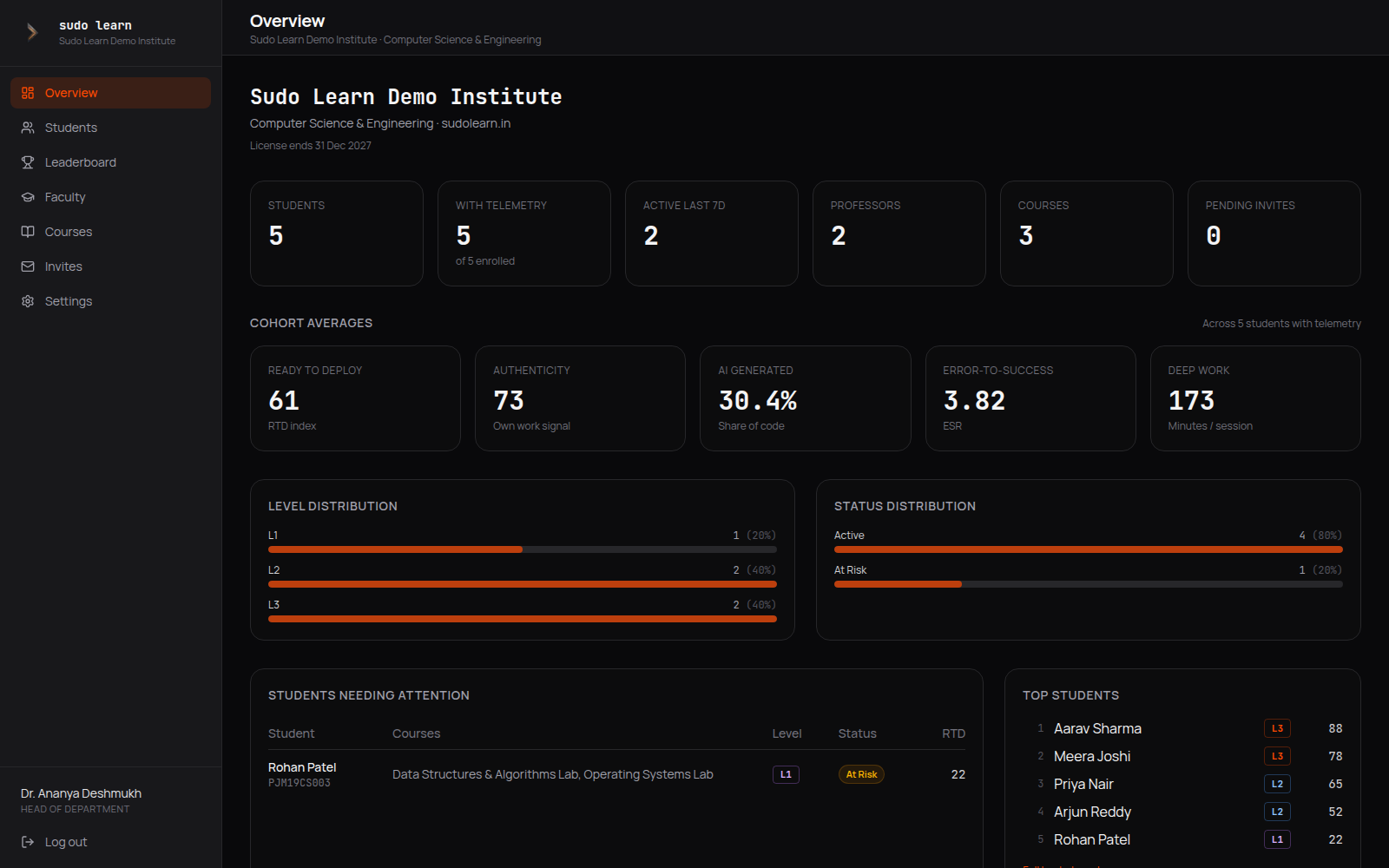
The department, on one page.
Counts, cohort averages, level and status distribution, students needing attention, courses and faculty load. The same numbers professors see in their courses, without the course boundary.
Who it is for
Three roles, three views, one record.
Deans and department heads
One page for the whole department: who is active, who is at risk, how faculty load is spread, and outcome coverage per course.
Professors
Their own courses only. A gradebook of real metrics, rules that flag students automatically, and a nudge that reaches the student's inbox.
Students
A record that follows them across courses and years, a mentor that makes them think first, and privacy controls they own.
How we deliver
From first call to a running department.
Every rollout starts as a pilot on one department. Nothing is bought before the record exists.
- 1
Intro call and requirements
Which courses, roughly how many students, which operating systems the labs use, who will be the department head on the account.
30 minutes
- 2
Institution created, HOD invited
We set up the institution with its license window and email the department head an invitation. They choose a password and are in.
day 1
- 3
Faculty and students invited
The HOD invites professors and creates courses. Professors add students by email; each invite enrols the student into the course on signup.
week 1
- 4
Sudo Code installed, first labs recorded
Students install the IDE, sign in once, and the first lab session produces telemetry the same day.
week 1–2
- 5
Review and rollout
After four weeks we walk through the record with the department and agree the rollout scope and license.
week 4–6
Commitments
What we hold ourselves to.
- No keystroke logging or screen capture
- Professors see trends, never chat transcripts
- Students control sharing and leaderboard visibility
- Every metric names the raw signal it comes from
- Accounts only by invitation, no default passwords
- Data retained only while the license is active
Take the deck to your next department meeting.
The PDF covers everything on this page in a form you can forward. If you would rather talk first, request a pilot and we will set up the intro call.